Get your license.
Pay $10 through Stripe Checkout. Your activation key appears after payment is confirmed.
⊞ A SMALL UTILITY FOR WINDOWS
Let the next round come to you. Play Again Helper recognizes the supported result screen and clicks Play Again once.
Download Windows app · License required
Windows · One active computer · Internet required
See exactly how it works ↓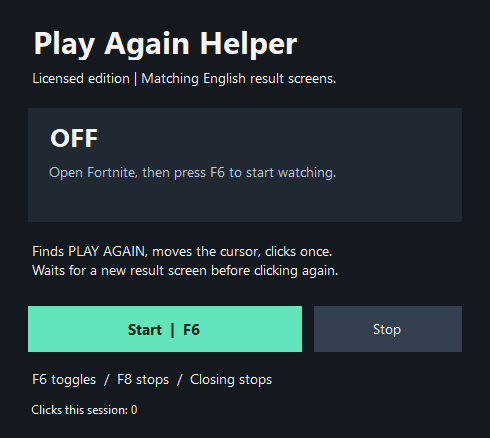
Small by design.
Simple to control.
THREE STEPS. THEN YOU’RE SET.
A focused helper for one repetitive action. Nothing starts until you tell it to.
Pay $10 through Stripe Checkout. Your activation key appears after payment is confirmed.
Open the Windows app, enter your key, then press F6 when you’re ready.
On a matching result screen, it moves the cursor to Play Again and clicks once. F8 or closing the app stops it.
KNOW WHAT YOU’RE GETTING
Looks for both PLAY AGAIN and RETURN TO LOBBY in the supported English result-screen layout.
Checks the foreground Fortnite window before clicking. It waits for a new result screen before another click.
Your license activates one Windows installation. A replacement PC or Windows reinstall may need an activation transfer.
PLAY AGAIN HELPER FOR WINDOWS
Windows application + an activation license.
Simple Start and Stop controls.
One-time payment. No subscription.
Secure payment through Stripe ↗BEFORE YOU BUY
It recognizes the supported result screen, moves your cursor to Play Again, and sends one left click. It does not play matches for you. You choose when it starts and stops.
A Windows PC, an internet connection for license checks, and the supported English result-screen layout. Screen or game updates can affect recognition. It is not a Mac, console, or mobile app.
Press F8, click Stop, or close the helper. If another program uses the default hotkeys, the app shows its available fallback shortcuts. It always opens OFF.
One license allows one active Windows installation. Contact lancehouse54@gmail.com for help moving your activation.
Digital sales are final except where a refund is required by applicable law. Please check the requirements and supported use before purchasing. This policy does not remove any rights you may have under applicable law.
No. Screen recognition happens locally. The activation service receives the license key and protected device identifiers to verify access; it does not receive gameplay screenshots.